Updated September 2026.
The breaking point arrived during a particularly hectic month. Managing seven concurrent projects, I completely forgot about a deliverable for a client — not missed the deadline, but literally forgot the project existed. Repairing that relationship took months. That incident forced me to face a harsh reality: my manual approach had reached its limit. Today, I manage twelve to fifteen concurrent projects with less stress than those chaotic seven used to cause — and I’ve reclaimed roughly twenty hours each week by automating the routine operational tasks. This guide covers every automation system an independent professional needs in 2026: from CRM and invoicing to AI-powered workflow automation. We’ll show you exactly which tools to use, how to connect them, and a 30-day plan to implement it all without feeling overwhelmed.Freelance business automation means using software to run the repetitive, non-billable parts of an independent business without manual effort: client onboarding, invoicing and payment reminders, scheduling, contracts, project updates, reporting and email follow-ups. A fully automated freelance operation in 2026 typically recovers 15 to 20 hours per week – time previously lost to administration – using a tool stack that costs under 100 dollars per month. The four highest-impact areas to automate first, in order of return, are invoicing and payment collection, client onboarding, meeting scheduling, and CRM follow-ups. Automation platforms such as Make, Zapier and n8n connect the individual tools, while AI assistants draft the written outputs (emails, briefs, reports) that automation delivers. The practical rule: any task performed more than three times per month in the same way is a candidate for automation.
What is freelance business automation?
For a focused deep-dive on the 6 daily operations every solo operator should automate, see our guide to AI business automation for freelancers — including a real ROI breakdown and a stack-by-budget framework.
See it applied: our 2026 case study on freelancers who automated 80% of their business walks through the exact stack, sequence, and ROI numbers behind a fully systemized freelance practice.
Freelance business automation is the practice of using software to handle repetitive operational tasks — invoicing, follow-ups, scheduling, client onboarding — so you can focus on billable, creative work. In 2026, automation has shifted from a competitive advantage to a baseline expectation: 84% of freelancers now regularly use AI-powered tools, up from just 41% in 2023. The financial case is clear. According to Kissflow’s 2026 workflow automation report, nearly 60% of workers estimate they could save 6+ hours per week if repetitive tasks were automated. For a freelancer billing $75/hour, that gap represents $23,000+ in annual income that either gets recovered through automation or quietly disappears into admin work. Want to understand which AI tools support your automation stack? See our guide on best AI tools for freelancers in 2026.Section 1: understanding the freelance automation maturity model
Automation can seem daunting, often associated with complex systems and costly software. It fundamentally involves using software tools to handle repetitive tasks — and the key is building gradually. The automation maturity model helps freelancers progress without feeling overwhelmed:- Stage 1 — Manual Chaos: Everything done by hand. High error rate, high stress.
- Stage 2 — Basic Tools: Separate apps for invoicing, email, calendar. Still mostly manual.
- Stage 3 — Connected Tools: Apps talk to each other via Zapier or Make. Workflows trigger automatically.
- Stage 4 — AI-Enhanced: AI handles content drafts, email replies, proposals. Human reviews and approves.
- Stage 5 — Full Workflow Automation: End-to-end systems. New lead to paid invoice with minimal manual steps.
Section 2: CRM automation for client management
Client relationship management (CRM) is the cornerstone of your automation strategy. Managing multiple client relationships manually leads to mistakes — sending proposals to the wrong person, forgetting to follow up, losing track of conversation history. A CRM system does more than store contact information. It tracks email exchanges, logs project history, schedules automatic follow-ups, and moves prospects through your sales pipeline based on their actions. When a prospect fills out your contact form, they receive an immediate acknowledgment email, their information is stored, and you’re reminded to respond — all while you sleep.CRM automation setup (HubSpot free)
- Create your pipeline: Lead → Contacted → Proposal Sent → Negotiating → Closed
- Set up a contact form connected to HubSpot via Zapier
- Create a 3-email follow-up sequence triggered when a new lead enters the pipeline
- Set deal rotation rules so no prospect goes more than 72 hours without contact
Section 3: automated invoicing and payment systems
Cash flow issues are the single biggest threat to freelance businesses. Most are caused not by lack of clients, but by inconsistent invoicing and slow follow-up on late payments. Automated invoicing systems send invoices immediately upon project completion, issue payment reminders at 7, 14, and 30 days, and apply late fees automatically. The result: average invoice payment time drops from 45 days to under 14 days for most freelancers who implement this system.Invoicing automation stack
- FreshBooks ($17/mo): Best for service-based freelancers. Auto-invoicing, expense tracking, time-to-invoice conversion.
- QuickBooks ($15/mo): Better for freelancers with complex tax situations or product sales.
- Wave (Free): Solid free option for freelancers just starting with automation.
Section 4: content creation automation
Content creation — proposals, blog posts, social media, client reports — consumes a disproportionate amount of freelance time. AI tools in 2026 can handle first drafts, outlines, and research, reducing content production time by 40–60%. The key is building an AI-assisted content workflow, not replacing your expertise with AI output. Use AI for the scaffolding; use your judgment and experience for the substance.Content automation workflow
- Brief → Outline: Use Claude or ChatGPT to generate a detailed outline from a one-sentence brief
- Outline → Draft: Expand each section with AI assistance, then edit with your expertise
- Draft → Publish: Use scheduling tools (Buffer, Later) to auto-publish social content
- Performance → Repurpose: Auto-identify top-performing content and repurpose across formats
Section 5: proposal and pitch automation
Proposals are high-stakes documents that most freelancers spend 2–4 hours creating from scratch each time. Automation reduces this to 20–30 minutes by maintaining a library of modular components — service descriptions, case studies, pricing tables, terms — that assemble into customized proposals in minutes. Tools like PandaDoc and Proposify integrate directly with your CRM, so when a prospect reaches the “Proposal Sent” stage in your pipeline, a personalized proposal draft is auto-generated using their contact data and project details.Proposal automation setup
- Create 3–5 proposal templates for your most common service types
- Connect PandaDoc or Proposify to HubSpot via Zapier
- Set up auto-follow-up: proposal reminder at day 3, day 7, day 14
- Trigger: when proposal is signed → create project → send onboarding email
Section 6: email marketing and follow-up automation
 Email automation is where most freelancers see their fastest ROI. Automated sequences nurture leads, follow up on proposals, re-engage past clients, and request testimonials — all without manual intervention.
The most impactful freelance email sequences to build first:
Email automation is where most freelancers see their fastest ROI. Automated sequences nurture leads, follow up on proposals, re-engage past clients, and request testimonials — all without manual intervention.
The most impactful freelance email sequences to build first:
- New lead sequence: 3 emails over 7 days after contact form submission
- Post-proposal sequence: Follow-up at day 3, 7, 14 after sending
- Post-project sequence: Thank you → testimonial request → re-engagement offer at 90 days
- Win-back sequence: Re-engage clients who haven’t worked with you in 6+ months
Section 7: workflow automation — connecting your entire stack
Workflow automation for freelancers refers to using platforms like Zapier or Make to connect separate software tools, enabling them to trigger actions in each other automatically. In 2026, Zapier supports over 9,000 app integrations; Make (formerly Integromat) enables complex multi-step workflows with a visual builder. AI-enabled freelancers who implement workflow automation report 25–35% faster project completion and earn on average 40% more per hour than peers who don’t. Workflow automation transforms a collection of separate tools into a unified business system where actions in one app automatically update related apps — eliminating the manual “copy-paste” work between platforms that consumes hours every week without generating a single billable dollar.Zapier vs Make: the right choice for freelancers
| Feature | Zapier | Make |
|---|---|---|
| App integrations | 9,000+ | 1,500+ |
| Ease of use | ⭐⭐⭐⭐⭐ Beginner-friendly | ⭐⭐⭐ Moderate learning curve |
| Free plan | 100 tasks/month | 1,000 operations/month |
| Starting price | $19.99/mo | $9/mo |
| AI Copilot | ✅ Build workflows in plain English | ❌ |
| Complex workflows | Good | Excellent |
| Best for | Most freelancers | Power users |
5 Essential workflows to build first
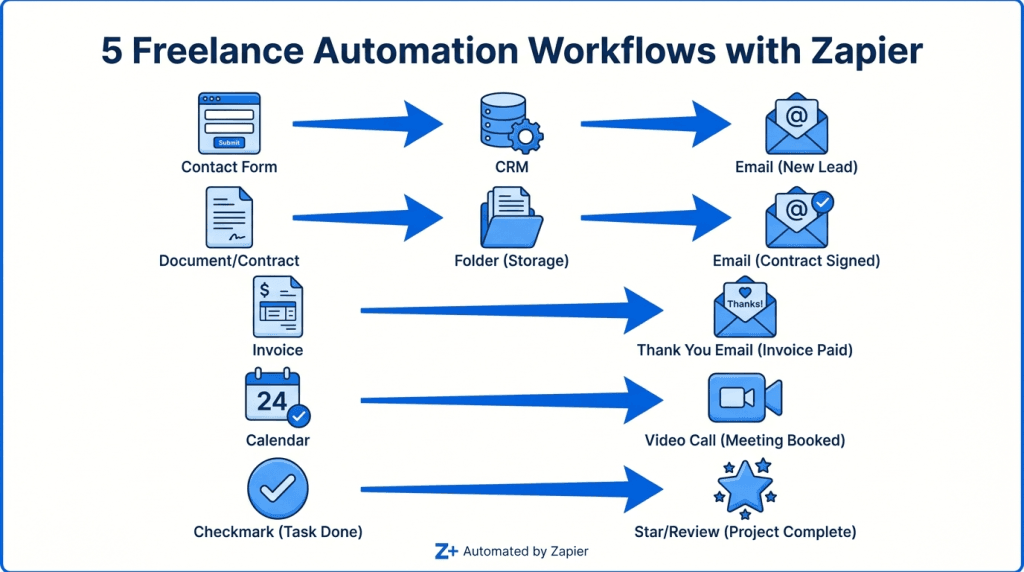
- Contact form → CRM + welcome email: New lead captured instantly, no manual entry
- Contract signed → Project setup: Drive folder created, onboarding email sent, project added to PM tool
- Invoice paid → Thank you + re-engagement: Automated relationship nurturing post-payment
- Calendly booking → Zoom link + reminder: No manual scheduling, no forgotten meetings
- Project complete → Testimonial request: Automated 72-hour delay then review request sent
Section 8: time tracking and productivity automation
Automated time tracking is the most overlooked automation in a freelancer’s stack — and one of the highest ROI. Without it, most freelancers systematically underbill. A 10-minute client email, a 15-minute revision round, a 20-minute strategy call: these small tasks add up to 3–5 unbilled hours per week. At $75/hour, that’s $900–$1,500 in lost revenue every month. Automated time tracking tools like Toggl Track and Clockify detect which app or website you’re actively using and log time automatically. At week’s end, they generate reports showing billable vs. non-billable time, by client and by project type — data that improves both billing accuracy and business decisions.Productivity automation stack
- Toggl Track — auto-detection by app, integrates with 100+ tools, reports ($9/mo, free plan available)
- Clockify — fully free, unlimited projects and users, solid reporting
- Calendly — eliminates scheduling emails, auto-creates Zoom links ($10/mo)
- RescueTime — passive activity tracking + focus mode + weekly scores ($12/mo)
- Loom — replaces status meetings with async video; saves 3–5 hours/week (free up to 25 videos)
Best freelance automation tools 2026 — complete comparison
| Tool | Category | Best For | Price/mo | Free Plan |
|---|---|---|---|---|
| Zapier | Workflow | Connecting 9,000+ apps | $19.99 | ✅ 100 tasks |
| Make | Workflow | Complex multi-step flows | $9 | ✅ 1,000 ops |
| HubSpot CRM | Client mgmt | Pipeline + sequences | Free–$45 | ✅ |
| FreshBooks | Invoicing | Auto-invoicing + payments | $17 | ❌ 30-day trial |
| Toggl Track | Time tracking | Billable hours capture | $9 | ✅ |
| Clockify | Time tracking | Budget-friendly tracking | Free | ✅ |
| Calendly | Scheduling | Eliminate scheduling emails | $10 | ✅ |
| Notion AI | Project mgmt | Tasks + client docs | $10 | ✅ |
| Mailchimp | Follow-up sequences | $13 | ✅ 500 contacts | |
| Loom | Communication | Async client updates | Free–$12.50 | ✅ |
| PandaDoc | Proposals | e-Sign + proposal automation | $19 | ❌ 14-day trial |
| QuickBooks | Finance | Tax + expense tracking | $15 | ❌ 30-day trial |
The two systems most freelancers build first now have their own dedicated guides: how to automate client onboarding, and how to automate client reporting with AI.
FAQ: automate your freelance business in 2026
How long does it take to set up automation for a freelance business?
Expect 20–30 hours of initial setup spread over 4–6 weeks. Your first automation — typically CRM + invoicing — takes the longest. Each subsequent workflow builds faster as you learn the tools. Most freelancers report recovering their full setup time investment within the first month. By week 3–4, expect 15–25% time savings; the full 30–40% gain arrives by month two.What is the best tool to automate a freelance business?
There is no single best tool — the answer is a stack. Start with HubSpot (free CRM), add Calendly ($10/mo) to eliminate scheduling, configure FreshBooks ($17/mo) for invoicing, then connect everything with Zapier. This $27–$47/month starter stack handles 80% of what most freelancers need to automate.Will automation make my client relationships feel impersonal?
Only if implemented poorly. The goal is to automate operational logistics — invoicing, reminders, scheduling — while keeping strategic communication personal. Clients consistently report experiencing better service after freelancers implement automation, because response times improve and nothing falls through the cracks. Use automation for the logistics; use your human judgment for strategy and relationships.Which automation should I set up first?
Start with invoicing automation. It has the most direct impact on cash flow and takes only 2–3 hours to configure. Automated payment reminders alone reduce average invoice payment time from 45 days to under 14 days for most freelancers. Once invoicing runs reliably, move to CRM, then scheduling, then full workflow automation.Do I need technical skills to automate my freelance business?
No coding required. Zapier’s 2026 AI Copilot lets you describe your desired workflow in plain English and builds it automatically. HubSpot, FreshBooks, and Calendly are all designed for non-technical users. Start with pre-built templates — both Zapier and Make offer hundreds of freelance workflow templates — before building custom ones.How much time can i realistically save by automating my freelance business?
According to Kissflow’s 2026 automation data, 60% of workers save 6+ hours per week through automation. For freelancers specifically, AI-powered automation saves an average of 8 hours per week. Freelancers who leverage these tools earn 40% more per hour than those who don’t — the combination of more billable hours and higher perceived value justifies premium rates.Can I automate my freelance business for free?
Yes, partially. HubSpot CRM (free), Clockify (free), Wave invoicing (free), and Zapier’s free tier (100 tasks/month) give you a working automation foundation at $0/month. This free stack covers the basics for freelancers with up to 5–10 active clients. As you scale, expect to invest $30–$50/month to remove limits and add more powerful features.Your 30-day action plan to automate your freelance business
Don’t let this guide become another article you bookmark and forget. Here’s your week-by-week implementation roadmap:Week 1 — CRM foundation
- Sign up for HubSpot CRM (free)
- Import all existing client and prospect contacts
- Create your 5-stage pipeline: Lead → Contacted → Proposal Sent → Negotiating → Closed
- Set up your first automated follow-up sequence for new leads (3 emails over 7 days)
Week 2 — Cash flow: invoicing automation
- Configure FreshBooks or QuickBooks with your service packages and hourly rates
- Set up automatic payment reminders at 7, 14, and 30 days overdue
- Create recurring invoice templates for any retainer clients
- Connect your invoicing tool to HubSpot via Zapier: deal closed → invoice created automatically
Week 3 — Time and scheduling
- Install Toggl Track desktop app and configure auto-tracking for your main work apps
- Set up Calendly with your real availability and sync with Google Calendar
- Replace your next 5 “let’s find a time” email threads with your Calendly booking link
- Review your first Toggl weekly report — identify unbilled time patterns
Week 4 — Workflow automation
- Build your first Zapier workflow: contact form submission → HubSpot contact + welcome email
- Build your second: invoice paid → thank you email + 90-day re-engagement reminder
- Review Weeks 1–3 automations and fix any gaps or missed triggers
- Calculate time saved — compare this week vs. your pre-automation baseline