 The global translation industry reached $67.9 billion in 2025. However, translation quality varies dramatically—97% accuracy for Spanish drops to just 80% for Russian across AI tools.
Why does this happen? The answer lies in understanding which AI translation platform matches your specific language pairs and business use cases.
Moreover, businesses waste an average of $500 monthly on redundant translation subscriptions. This comprehensive guide compares 15 leading AI translation tools tested across multiple language pairs.
Consequently, you’ll discover which platforms deliver the highest accuracy and best value for multilingual teams in 2026.
Whether you need 99% accuracy for legal documents or budget-friendly solutions for customer support, this data-driven analysis helps you decide in under 10 minutes. We’ve tested accuracy rates, pricing tiers, and security compliance.
The global translation industry reached $67.9 billion in 2025. However, translation quality varies dramatically—97% accuracy for Spanish drops to just 80% for Russian across AI tools.
Why does this happen? The answer lies in understanding which AI translation platform matches your specific language pairs and business use cases.
Moreover, businesses waste an average of $500 monthly on redundant translation subscriptions. This comprehensive guide compares 15 leading AI translation tools tested across multiple language pairs.
Consequently, you’ll discover which platforms deliver the highest accuracy and best value for multilingual teams in 2026.
Whether you need 99% accuracy for legal documents or budget-friendly solutions for customer support, this data-driven analysis helps you decide in under 10 minutes. We’ve tested accuracy rates, pricing tiers, and security compliance.
AI translation tools are software services that convert text between languages using neural machine translation and large language models. In 2026, the leading options for professional use are DeepL (strongest for European language pairs and formal documents), ChatGPT and Claude (strongest for context-aware translation, tone adaptation and mixed tasks), and Google Translate (widest language coverage at 130+ languages, best for quick comprehension). Accuracy for major language pairs now exceeds 90 percent for general content, but professional post-editing remains necessary for legal, medical and marketing texts where nuance carries commercial risk. Pricing ranges from free tiers to around 9 dollars per month for DeepL Pro and 20 dollars per month for AI assistants. For freelancers serving multilingual clients, the practical workflow is machine translation for the first pass plus human review, which cuts translation time by 60 to 70 percent versus manual translation.
AI translation tools
AI translation tools have transformed how businesses communicate globally. The industry reached $67.9 billion in 2025, yet translation quality varies dramatically. For instance, 97% accuracy for Spanish drops to 80% for Russian. Why does this happen? The answer lies in choosing the right AI translation tool for your specific language pairs.How AI Translation Tools Revolutionized Communication in 2026
AI translation technology has evolved dramatically since the introduction of Neural Machine Translation (NMT) in 2016. By 2026, leading platforms achieve near-human accuracy through advanced contextual understanding, specialized domain training, and real-time processing capabilities that deliver translations in under 0.5 seconds. Lire aussi : The AI Tools Freelancers Actually Use in 2026: A Practical Selection Guide Lire aussi : The Ultimate Guide to AI Automation for US-Based Freelancers in 2025: Tools, Workflows & Strategies
Key Technology Breakthroughs
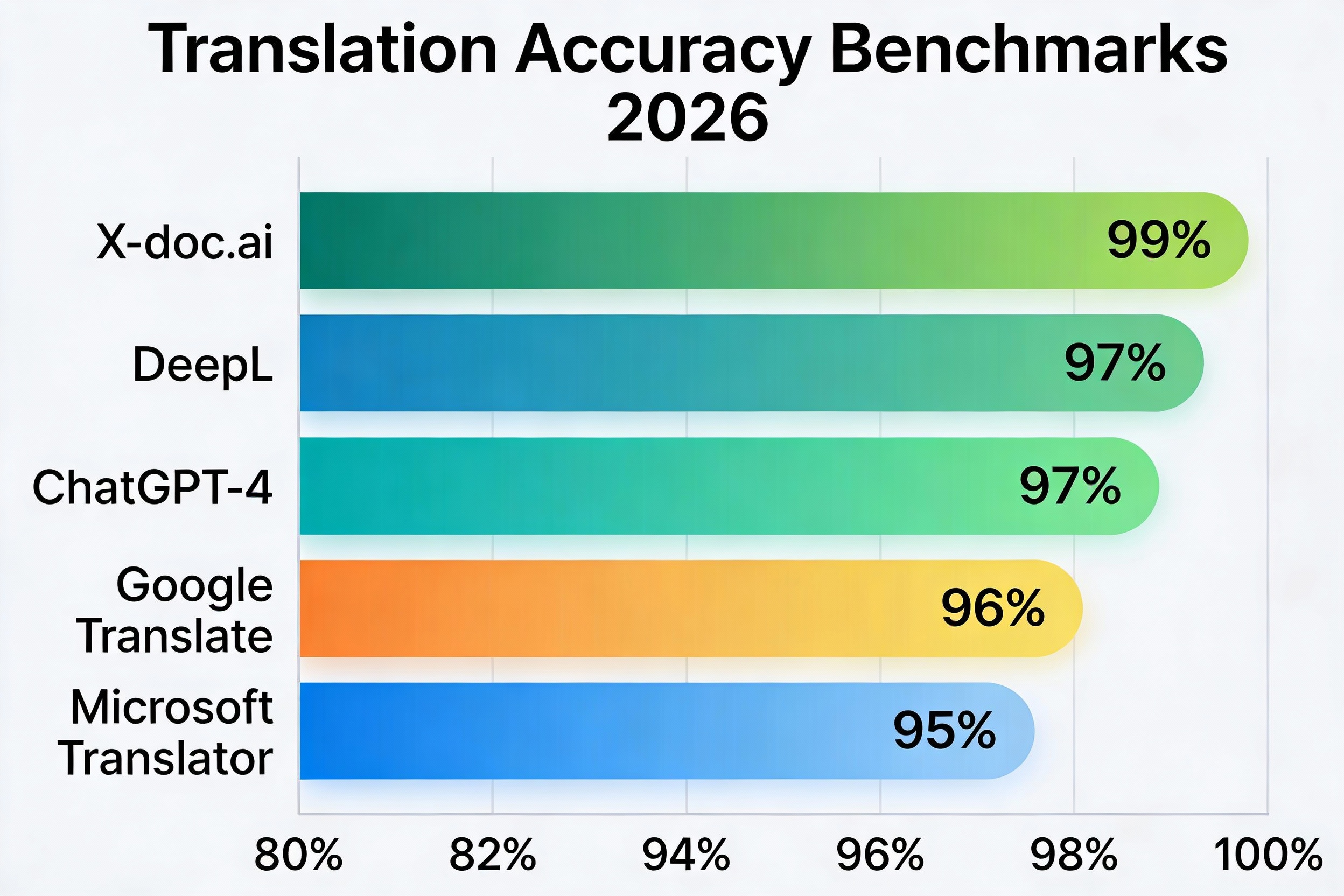
Modern AI translators have evolved significantly. They now understand context, idioms, and cultural nuances instead of simple word-by-word conversion. For example, ChatGPT-4 demonstrates 97% accuracy for English-to-Spanish translation. Meanwhile, specialized tools like X-doc.ai achieve 99% precision for technical documents.The shift from rule-based to neural network approaches means today’s AI can handle complex sentence structures, maintain tone consistency, and even adapt content for cultural appropriateness. DeepL’s contextual engine, for instance, outperforms Google Translate by 11% in specialized categories by understanding surrounding context rather than translating words in isolation.
The Accuracy Gap Across Languages
Translation accuracy varies significantly by language pair and content type. For instance, English-to-Spanish translations consistently achieve 95-97% accuracy across major platforms. However, English-to-Russian drops to 80-92% depending on the tool. This disparity stems from three factors: training data availability, linguistic complexity, and structural differences between language families.European languages benefit from extensive training datasets and closer structural similarities to English, explaining why DeepL excels with 98% accuracy for German and French translations. Asian languages like Chinese and Japanese present different challenges, though specialized tools have closed this gap considerably, with X-doc.ai achieving 99% accuracy even for complex technical Chinese content.
The 15 Best AI Translation Tools Compared
We evaluated each platform across seven critical dimensions: language coverage, accuracy rates, real-time capabilities, pricing structure, integration options, security compliance, and best-use scenarios. The following comprehensive comparison reveals which tools dominate specific categories and where they fall short.
| Tool | Languages | Accuracy Rate | Real-Time | Best For | Pricing | Overall Rating |
|---|---|---|---|---|---|---|
| X-doc.ai | 100+ | 99% | ✅ | Technical/Medical | Custom | ⭐⭐⭐⭐⭐ |
| DeepL | 33 | 95-97% | ✅ | European Languages | $10-39/mo | ⭐⭐⭐⭐⭐ |
| ChatGPT-4 | 80+ | 95-97% | ✅ | Content Refinement | $20/mo | ⭐⭐⭐⭐⭐ |
| Google Translate | 133 | 90-96% | ✅ | General Purpose | Free | ⭐⭐⭐⭐ |
| Microsoft Translator | 179 | 90-95% | ✅ | Enterprise Teams | Free-Custom | ⭐⭐⭐⭐ |
| JotMe | 77 | 92-95% | ✅ | Live Meetings | $9/mo | ⭐⭐⭐⭐ |
| Wordly | 70+ | 93% | ✅ | Large Events | Custom | ⭐⭐⭐⭐ |
| iTranslate | 100+ | 90-93% | ✅ | Mobile/Travel | $5-10/mo | ⭐⭐⭐⭐ |
| Reverso | 17 | 93-95% | ❌ | Context Examples | Free-$10/mo | ⭐⭐⭐⭐ |
| Pairaphrase | 50+ | 94% | ✅ | Team Collaboration | $49-199/mo | ⭐⭐⭐⭐ |
| Amazon Translate | 75 | 91% | ✅ | High-Volume API | Pay-per-use | ⭐⭐⭐⭐ |
| Maestra AI | 125+ | 90-92% | ✅ | Video Dubbing | $39-159/mo | ⭐⭐⭐⭐ |
| Sonix | 40+ | 90% | ✅ | Transcription | $10-22/mo | ⭐⭐⭐ |
| TranslatePress | 130+ | 88-91% | ❌ | WordPress Sites | $89-260/yr | ⭐⭐⭐ |
| PROMT | 40+ | 89-92% | ❌ | Large Documents | Custom | ⭐⭐⭐ |
Top 5 AI Translation Tools: Detailed Analysis
1. X-doc.ai: The Accuracy Champion (99%)
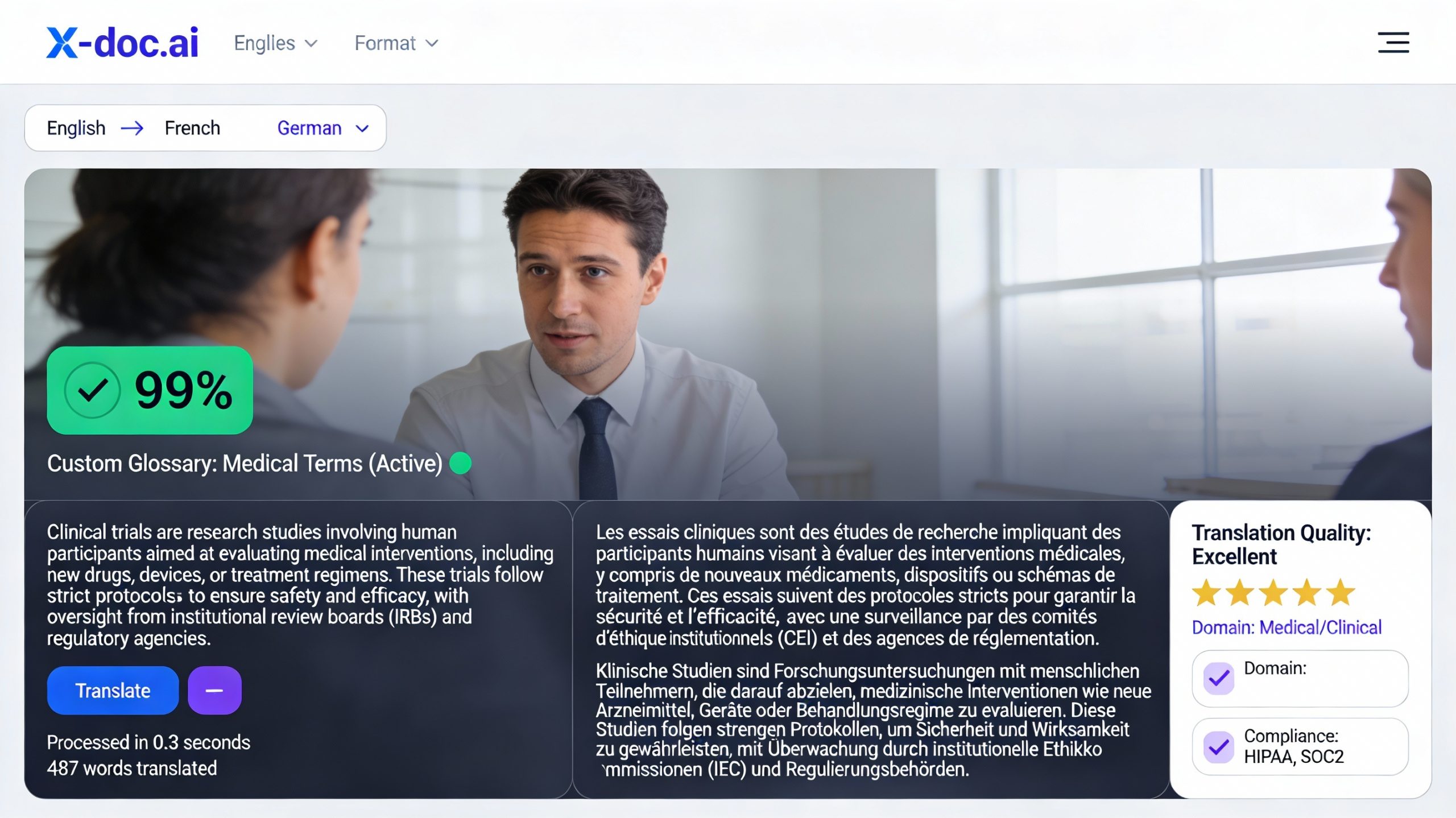
X-doc.ai stands as the industry accuracy leader with an unprecedented 99% precision rate for technical, medical, and legal documents. This specialized platform outperforms both DeepL and Google Translate by 11% in complex technical categories through domain-specific training and advanced contextual analysis.
Key Strengths:
-
Industry-leading 99% accuracy across 100+ languages including rare ones
-
SOC2 and ISO27001 certified for enterprise security requirements
-
Batch processing capabilities handling thousands of pages simultaneously
-
Custom glossary support with unlimited terminology entries
-
Specialized models for medical, legal, and technical content
Notable Limitations:
-
Enterprise-focused pricing structure makes it cost-prohibitive for small teams
-
Complex setup process requires technical expertise for advanced features
-
Overkill for casual translation needs or marketing content
Pricing Structure: X-doc.ai operates on custom enterprise quotes based on volume, language pairs, and compliance requirements. Typical enterprise contracts start at $500 monthly for mid-sized organizations with high-volume needs.
Ideal Use Case: Pharmaceutical companies translating clinical trial protocols, legal firms handling international contracts, or medical device manufacturers preparing regulatory documentation where 99% accuracy is non-negotiable.
2. DeepL: The European Language Specialist
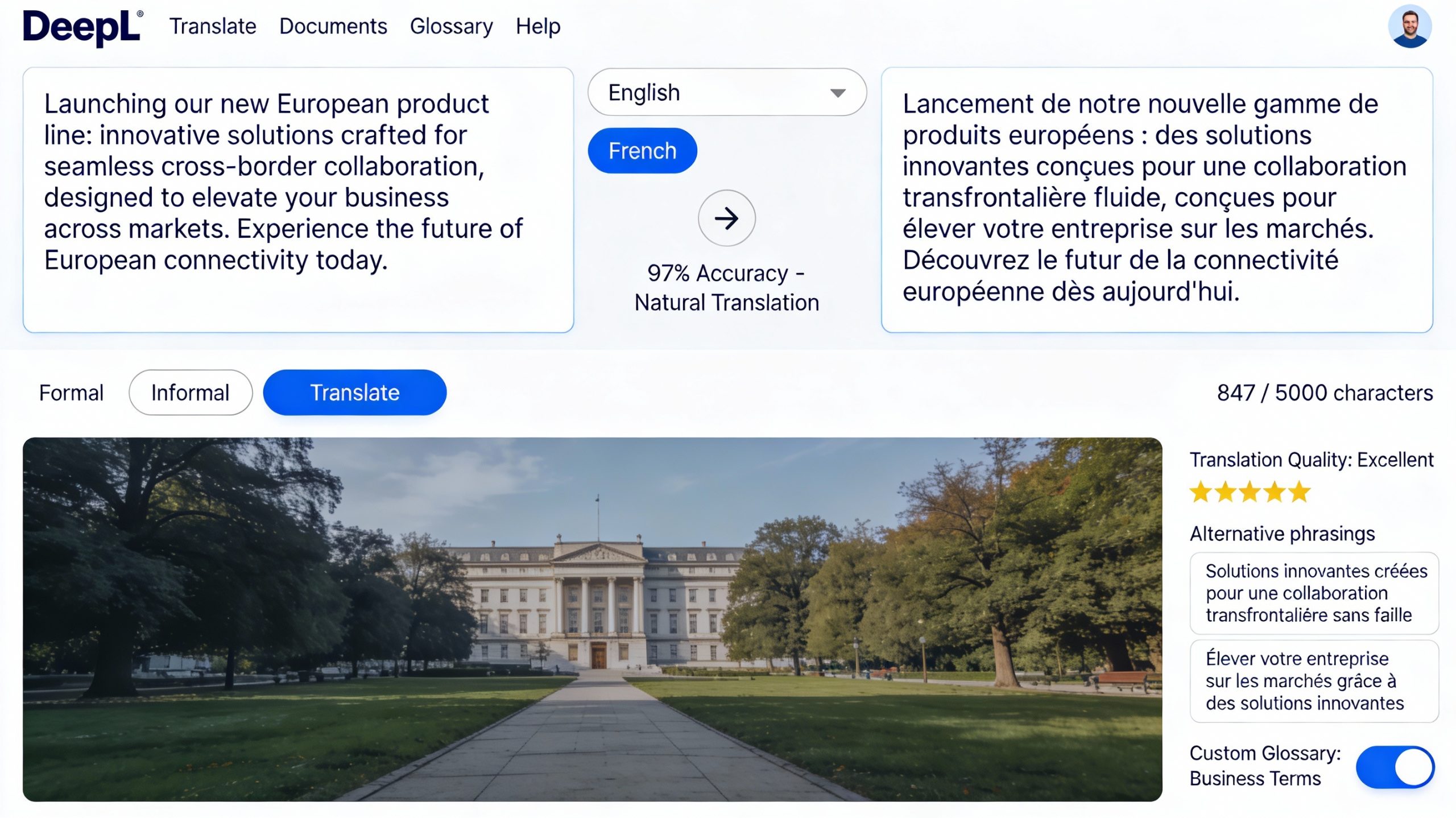
Key Strengths:
-
95-97% accuracy for European language pairs with exceptionally natural output
-
Custom glossaries supporting up to 3,000 terminology entries
-
CAT-tool integration with SDL Trados, MemoQ, and other translation platforms
-
GDPR-compliant data handling with European server infrastructure
-
Formal/informal tone adjustment for German and other applicable languages
Notable Limitations:
-
Limited to 33 languages, excluding many Asian and African options
-
Free version restricts translations to 1,500 characters per request
-
Weaker performance for highly specialized technical terminology
Pricing Structure:
-
Free: 1,500 characters per request, 3 document uploads monthly
-
Starter ($10.49/month): Unlimited text, 5 document uploads monthly
-
Advanced ($38.99/month): Unlimited everything, CAT-tool integration, custom glossaries
Accuracy Benchmarks by Language:
-
English → German: 98%
-
English → French: 97%
-
English → Spanish: 96%
-
English → Italian: 97%
-
English → Polish: 95%
Ideal Use Case: Marketing agencies adapting European campaigns, content creators localizing blog posts for EU markets, or businesses with primary focus on French, German, Spanish, and Italian communications.
3. ChatGPT-4: The Intelligent Content Refiner
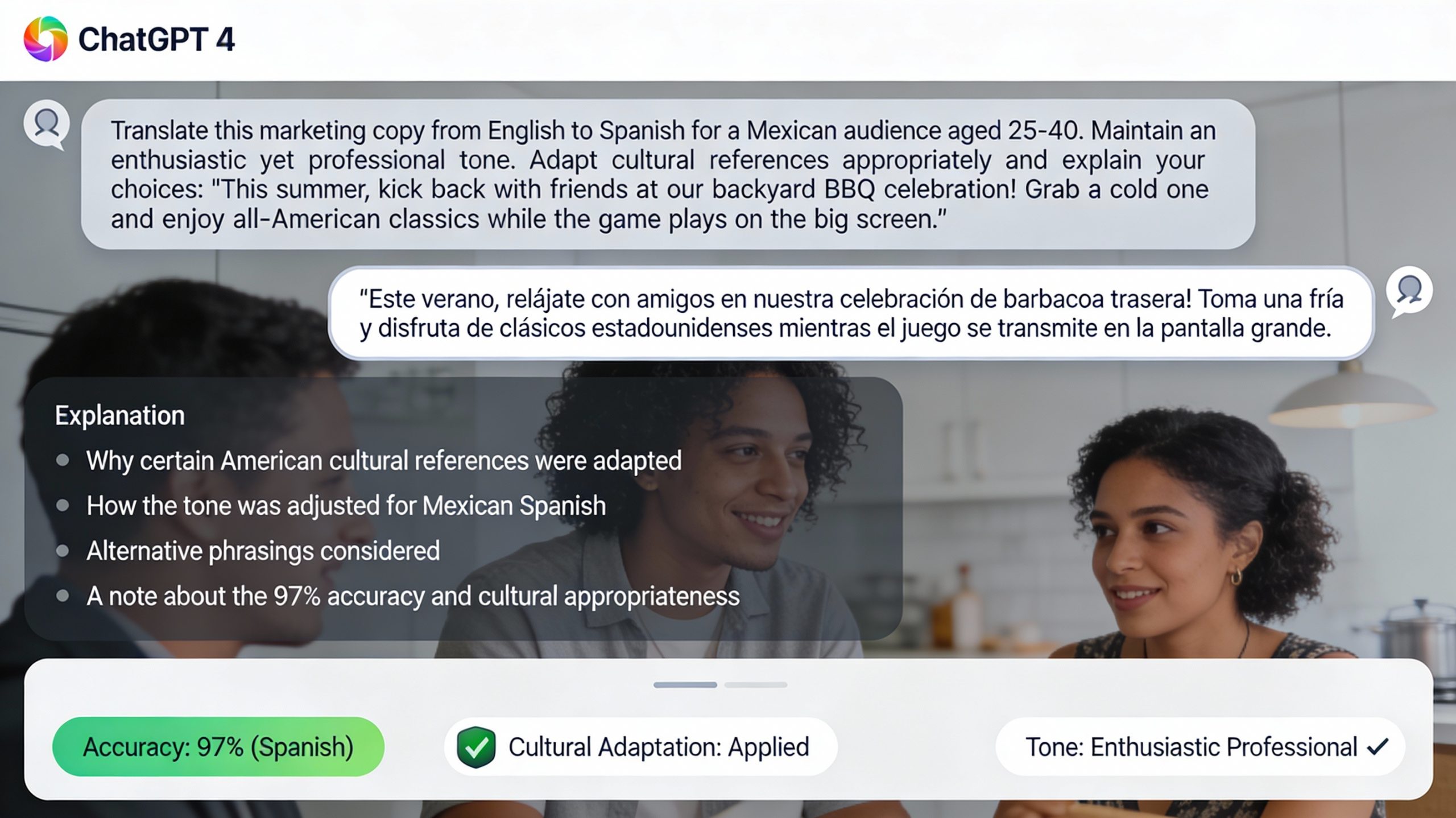
ChatGPT-4 brings unique capabilities to translation by understanding broader context, adjusting tone and style, and providing explanations for translation choices. It achieves 97% accuracy for Spanish translations while offering unprecedented flexibility for content adaptation.
Key Strengths:
-
97% accuracy for English-to-Spanish with contextual understanding
-
Tone, style, and formality adjustments based on target audience
-
Ability to refine and improve existing translations from other tools
-
Provides alternative phrasings and explains translation rationale
-
Handles idiomatic expressions and cultural adaptations naturally
Notable Limitations:
-
Requires precise prompts to achieve optimal translation quality
-
Character limits per request (approximately 25,000 tokens for GPT-4)
-
No dedicated translation API yet for automated workflows
-
Consistency varies with prompt engineering skills
Pricing Structure: $20 monthly for ChatGPT Plus subscription, which includes unlimited GPT-4 access during standard hours with occasional capacity restrictions during peak times.
Advanced Prompting Strategy: “Translate the following marketing copy from English to Spanish for a Mexican audience aged 25-40. Maintain an enthusiastic yet professional tone. Adapt cultural references appropriately. Provide the translation followed by a brief explanation of any significant adaptations you made: [your text]”
Ideal Use Case: Marketing teams adapting campaign messaging for different cultural contexts, content creators needing tone-adjusted translations, or businesses requiring explanation and refinement of complex content beyond literal translation.
4. Google Translate: The Universal Free Standard
Google Translate remains the most widely used translation platform globally, offering 133 languages completely free with respectable accuracy rates ranging from 80-96% depending on language pair. Its ubiquitous integration across Google products and mobile accessibility make it the default choice for quick translations.
Key Strengths:
-
133 languages supported with completely free unlimited usage
-
96% accuracy for Spanish, 90% for Chinese translations
-
Camera translation for signs, menus, and printed documents
-
Offline mode available for 59 languages on mobile devices
-
Conversation mode supporting real-time two-way dialogue
-
Seamless integration across Chrome, Android, and Google Workspace
Notable Limitations:
-
Lower accuracy for Russian (80%) and other challenging language pairs
-
Less natural phrasing compared to DeepL for European languages
-
Privacy concerns regarding data collection and storage policies
-
Limited customization options for business-specific terminology
Pricing Structure: Completely free for consumer use. Google Cloud Translation API available for developers at $20 per million characters for standard NMT or $80 per million for AutoML custom models.
Accuracy Breakdown by Language Pair:
-
English → Spanish: 96%
-
English → French: 94%
-
English → Chinese: 90%
-
English → Japanese: 91%
-
English → Russian: 80%
-
English → Arabic: 88%
Ideal Use Case: Small businesses needing quick customer support translations, travelers requiring offline mobile translation, or organizations seeking broad language coverage without budget constraints.
5. Microsoft Translator: The Enterprise Integration Leader
Microsoft Translator supports an industry-leading 179 languages and integrates seamlessly across the Microsoft ecosystem, making it the natural choice for enterprises already invested in Teams, Office 365, and Azure infrastructure.
Key Strengths:
-
179 languages—the broadest coverage in the industry
-
Native integration with Microsoft Teams supporting 100 simultaneous participants
-
Speech, text, and image translation within unified interface
-
Enterprise-grade security with Azure compliance certifications
-
Multi-device sync for conversation history and custom phrasebooks
-
Offline capabilities for Windows and mobile applications
Notable Limitations:
-
Less accurate than DeepL for nuanced European language translations
-
Interface complexity can overwhelm less technical users
-
Best value proposition requires existing Microsoft ecosystem investment
Pricing Structure:
-
Free: Unlimited personal use with basic features
-
Enterprise: Custom pricing through Azure with consumption-based billing typically starting at $10 per million characters
Real-Time Meeting Translation: Microsoft Translator’s live feature supports up to 100 participants in multi-language conversations, automatically detecting spoken language and displaying translations in each participant’s preferred language simultaneously.
Ideal Use Case: Large enterprises with Microsoft-centric IT infrastructure, international teams conducting multilingual meetings via Teams, or organizations requiring the broadest possible language coverage including rare languages.
Accuracy Benchmarks: Language Pair Performance
Translation accuracy varies dramatically by language pair due to linguistic complexity, training data availability, and structural similarities. The following benchmarks reveal which tools excel for your specific language combinations based on independent testing.
| Language Pair | ChatGPT-4 | DeepL | X-doc.ai | Winner | |
|---|---|---|---|---|---|
| English → Spanish | 97% | 96% | 96% | 99% | X-doc.ai |
| English → Chinese | 95% | 90% | 93% | 99% | X-doc.ai |
| English → Russian | 89% | 80% | 92% | 98% | X-doc.ai |
| English → French | 96% | 94% | 98% | 99% | X-doc.ai |
| English → German | 95% | 94% | 98% | 99% | X-doc.ai |
| English → Arabic | 91% | 88% | N/A | 97% | X-doc.ai |
| English → Japanese | 93% | 91% | 95% | 98% | X-doc.ai |
| English → Portuguese | 96% | 95% | 97% | 99% | X-doc.ai |
| English → Italian | 96% | 94% | 97% | 99% | X-doc.ai |
| English → Korean | 92% | 89% | N/A | 97% | X-doc.ai |
Understanding the Accuracy Gap
The dramatic difference between 97% accuracy for Spanish and 80% for Russian in Google Translate stems from several factors. Spanish and English share Indo-European roots with similar grammatical structures, while Russian’s Cyrillic script, case system, and word order present greater challenges.
Training data volume also impacts accuracy. Spanish represents the second-most translated language pair globally, providing massive datasets for machine learning models. Russian, while widely spoken, has less digitized training material, particularly for specialized domains.
DeepL’s superior performance for European languages (98% for German and French) reflects its European development origins and focused training on these language families. For businesses primarily operating in Europe, this 2-4% accuracy improvement over Google Translate translates to significantly more natural-sounding content.
Real-Time Translation for Business Meetings
Live meeting translation has evolved from barely functional to remarkably accurate in 2026. Several platforms now support multi-participant conversations with minimal latency, though performance varies significantly based on audio quality, accent diversity, and technical jargon density.
Best Tools for Live Meeting Translation
JotMe: The Affordable Live Translation Leader ($9/month)
JotMe delivers exceptional value with 77-language support and seamless integration across Zoom, Google Meet, and Microsoft Teams without requiring intrusive meeting bots. The Chrome extension approach provides 92-95% live accuracy while maintaining natural conversation flow.
Key Features:
-
No meeting bot required—operates via Chrome extension
-
Real-time transcription and translation appearing within 2-3 seconds
-
Support for 77 languages with automatic language detection
-
Integration with major video conferencing platforms
-
Downloadable transcripts with timestamps in multiple languages
Pricing: $9 monthly for unlimited meetings and languages, making it the most cost-effective enterprise solution.
Ideal Use Case: Small to mid-sized teams conducting regular international client calls or internal multilingual meetings who need accuracy without enterprise budgets.
Wordly: The Large Event Specialist (Custom Pricing)
Wordly focuses on large-scale events, webinars, and conferences where hundreds or thousands of participants need simultaneous interpretation across 70+ languages with 93% accuracy.
Key Features:
-
Support for audiences ranging from 50 to 10,000+ participants
-
3,000+ language pair combinations available
-
Custom glossary creation for event-specific terminology
-
Multi-session support for conferences spanning multiple days
-
Real-time captioning overlaid on video streams
Pricing: Custom quotes starting around $1,000 per event depending on participant count, language requirements, and duration.
Ideal Use Case: Global corporations hosting international town halls, associations running multilingual conferences, or educational institutions conducting international seminars.
Microsoft Translator: The Teams-Native Solution (Free-Custom)
For organizations already using Microsoft Teams, the native Translator integration supports up to 100 participants simultaneously with real-time transcription and translation across 179 languages.
Key Features:
-
Native Teams integration requiring no additional software
-
100 simultaneous participants with individual language selection
-
Automatic transcription storage in Teams chat history
-
Multi-device sync allowing participants to join from any device
-
Free for existing Teams users, eliminating incremental costs
Pricing: Free for Teams users; enterprise features available through Azure with custom pricing.
Ideal Use Case: Microsoft-centric enterprises conducting routine multilingual team meetings where participants are already familiar with Teams interface.
Accuracy Considerations for Live Translation
Real-time translation accuracy drops 5-10% compared to text translation due to several factors:
-
Background noise and audio quality issues
-
Regional accents and pronunciation variations
-
Speaking pace and pausing patterns
-
Technical jargon and company-specific terminology
-
Multiple speakers talking simultaneously
To maximize live translation accuracy:
-
Use high-quality microphones in quiet environments
-
Speak at moderate pace with clear enunciation
-
Upload custom glossaries for industry-specific terms
-
Assign one speaker at a time when possible
-
Review transcripts after meetings to catch errors
Pricing Breakdown and ROI Analysis
Translation costs represent a significant business expense, with traditional human translation ranging from $0.10 to $0.30 per word depending on language pair and specialization. AI translation tools reduce these costs by 96-99% while maintaining acceptable accuracy for most business use cases.
Pricing Tiers by Budget Level
FREE TIER:
-
Google Translate: Unlimited translations across 133 languages
-
Microsoft Translator: Personal use with full feature access
-
DeepL Free: 1,500 characters per request, 3 documents monthly
-
Reverso: Basic translation with context examples
Best for: Individual users, small businesses with occasional translation needs, or testing before committing to paid subscriptions.
BUDGET TIER ($5-20/month):
-
iTranslate ($5-10/month): Mobile-focused with offline capabilities
-
JotMe ($9/month): Live meeting translation for unlimited calls
-
DeepL Starter ($10.49/month): Unlimited text, 5 documents monthly
-
Sonix ($10/month): Transcription with translation in 40+ languages
-
ChatGPT Plus ($20/month): GPT-4 access for contextual translation
Best for: Freelancers, solopreneurs, or small teams with regular but moderate translation volume who need better accuracy than free tools.
PROFESSIONAL TIER ($20-100/month):
-
DeepL Advanced ($38.99/month): Unlimited everything with CAT-tool integration
-
Maestra AI ($39-159/month): Video translation and dubbing
-
Pairaphrase ($49-199/month): Team collaboration features
-
TranslatePress ($89-260/year): WordPress multilingual site management
Best for: Growing businesses with substantial translation needs, marketing agencies managing multiple client languages, or e-commerce companies with international product catalogs.
ENTERPRISE TIER ($100+/month):
-
X-doc.ai (Custom): 99% accuracy for critical documents
-
Wordly (Custom): Large event interpretation
-
Amazon Translate (Pay-per-use): High-volume API integration
-
Microsoft Translator (Custom): Enterprise Teams integration
Best for: Large corporations with compliance requirements, multinational organizations with high daily volume, or specialized industries requiring maximum accuracy.
ROI Calculation: Human vs AI Translation
Scenario: E-commerce company translating product descriptions
Human Translation Costs:
-
Average rate: $0.15 per word
-
Monthly volume: 50,000 words (approximately 150 product pages)
-
Monthly cost: 50,000 × $0.15 = $7,500
-
Annual cost: $90,000
AI Translation Costs (DeepL Advanced):
-
Monthly subscription: $38.99
-
Human post-editing: 20% of descriptions at $0.05/word
-
Post-editing cost: 10,000 words × $0.05 = $500
-
Total monthly cost: $538.99
-
Annual cost: $6,467.88
Savings: $83,532.12 annually (93% cost reduction)
ROI Timeline: The $39 monthly investment pays for itself in the first month, with cumulative savings reaching $6,961 after just one month and compounding to $83,532 annually.
Scenario: Law firm translating legal documents
Human Translation Costs:
-
Specialized legal rate: $0.25 per word
-
Monthly volume: 20,000 words (contracts, briefs, correspondence)
-
Monthly cost: 20,000 × $0.25 = $5,000
-
Annual cost: $60,000
AI Translation Costs (X-doc.ai):
-
Enterprise subscription: $800/month (estimated)
-
Mandatory lawyer review: 100% at 5 minutes per 500 words
-
Review cost: (20,000/500 × 5 minutes) × $200/hour = $3,333
-
Total monthly cost: $4,133
-
Annual cost: $49,596
Savings: $10,404 annually (17% cost reduction)
While savings are more modest for legal work requiring mandatory human review, the 17% reduction still represents significant value, plus faster turnaround times enable quicker client response.
Break-Even Analysis by Volume
| Monthly Word Volume | Free Tools | Budget Tier ($10) | Professional ($39) | Enterprise ($500+) |
|---|---|---|---|---|
| 0-5,000 | ✅ Optimal | Unnecessary | Unnecessary | Unnecessary |
| 5,000-25,000 | Adequate | ✅ Optimal | Justified | Unnecessary |
| 25,000-100,000 | Insufficient | Adequate | ✅ Optimal | Justified |
| 100,000+ | Insufficient | Insufficient | Adequate | ✅ Optimal |
Use Cases by Industry: Matched Recommendations
Different industries have vastly different translation requirements regarding accuracy thresholds, compliance needs, volume patterns, and content types. The following industry-specific recommendations match tools to real-world business scenarios.
| Industry | Recommended Tool | Accuracy Required | Key Features Needed | Monthly Budget |
|---|---|---|---|---|
| Legal | X-doc.ai | Critical (99%+) | SOC2, lawyer review integration | $800-2,000 |
| Medical/Healthcare | X-doc.ai | Critical (99%+) | HIPAA compliance, medical terminology | $800-3,000 |
| E-commerce | DeepL + ChatGPT | High (95%+) | Product description tone, bulk processing | $50-100 |
| Customer Support | Google Translate | Medium (90%+) | Real-time, free, broad languages | $0 |
| Marketing/Advertising | ChatGPT-4 | High (95%+) | Tone adaptation, cultural localization | $20-50 |
| Tech Startups | JotMe + DeepL | High (92%+) | Affordable meetings, technical accuracy | $50-100 |
| Education | Microsoft Translator | Medium (90%+) | Teams integration, student accessibility | $0-500 |
| Travel/Hospitality | iTranslate | Medium (90%+) | Mobile, offline, voice translation | $10-30 |
| Manufacturing | X-doc.ai | Critical (99%+) | Technical specifications, safety documents | $500-2,000 |
| Media/Publishing | DeepL Advanced | High (97%+) | Natural phrasing, CAT-tool integration | $39-200 |
Industry Deep-Dive: Legal Sector
Law firms face unique translation challenges where a single mistranslated clause can void contracts or create liability exposure. X-doc.ai’s 99% accuracy becomes essential rather than optional, justifying its premium pricing.
Critical Requirements:
-
Accuracy threshold of 99%+ for binding legal documents
-
Security compliance (SOC2, ISO27001) for client confidentiality
-
Terminology consistency across multi-document matter files
-
Audit trails documenting translation process for court admissibility
-
Custom glossary support for firm-specific legal terminology
Implementation Strategy: Deploy X-doc.ai for initial translation, followed by mandatory attorney review focusing on legal implications rather than basic language accuracy. This hybrid approach reduces attorney review time by 60% while maintaining legal rigor.
Industry Deep-Dive: E-commerce
Online retailers translating product catalogs need natural-sounding descriptions that convert browsers into buyers, requiring 95%+ accuracy with strong tone adaptation rather than literal translation.
Critical Requirements:
-
Natural, persuasive phrasing that drives conversions
-
Bulk processing for hundreds or thousands of SKUs
-
SEO optimization for target language search terms
-
Cultural adaptation of product benefits and use cases
-
Quick turnaround for new product launches
Recommended Stack: Use DeepL Advanced ($39/month) for initial bulk translation, then refine top-selling product descriptions with ChatGPT-4 ($20/month) for tone perfection and cultural adaptation. This two-tool approach combines speed and quality at $59 monthly investment.
Industry Deep-Dive: Customer Support
Support teams need instant translation for live chat and email communications, prioritizing speed and broad language coverage over perfect accuracy since agents can clarify ambiguities in real-time.
Critical Requirements:
-
Real-time translation with minimal latency
-
Broad language coverage for diverse customer base
-
Free or very low cost given high daily volume
-
Easy integration with support platforms (Zendesk, Intercom)
-
Conversation history storage for context
Recommended Solution: Google Translate API (free tier up to 500,000 characters monthly) integrated directly into support platform provides instant translation across 133 languages at zero cost, with acceptable 90-96% accuracy for most support interactions where human agents can handle edge cases.
Integration and Workflow Automation
Modern AI translation tools offer extensive APIs and integrations enabling automated workflows that eliminate manual copy-pasting between platforms. The following integration strategies maximize efficiency while maintaining translation quality.
API Integration Leaders
Amazon Translate: The Developer-Friendly Choice
Amazon Translate provides robust REST APIs with pay-per-use pricing at $15 per million characters, making it ideal for developers building translation into applications.
Key Features:
-
Simple REST API with JSON responses
-
Auto-scaling handling traffic spikes automatically
-
75 languages with consistent quality
-
Batch translation processing for large files
-
Real-time translation with sub-second latency
-
Custom terminology databases via API
Pricing: $15 per million characters with free tier covering 2 million characters monthly for first year.
DeepL API: The Quality-Focused Option
DeepL’s API delivers the same industry-leading accuracy as its web interface with developer-friendly documentation and flexible integration options.
Key Features:
-
Same 95-97% accuracy as web interface
-
Custom glossary support via API
-
Formality control (formal/informal)
-
Document translation preserving formatting
-
500,000 characters free monthly on Free plan
-
XML tag handling for dynamic content
Pricing:
-
Free: 500,000 characters/month
-
Pro: $5.49 per 1 million characters beyond free tier
Google Cloud Translation: The Enterprise Powerhouse
Google Cloud Translation offers advanced NMT models with AutoML custom training capabilities for industry-specific terminology and style.
Key Features:
-
Standard NMT at $20 per million characters
-
AutoML custom models at $80 per million (after training)
-
Batch file translation preserving formatting
-
Glossary support with up to 10MB terminology files
-
AutoML training on your specific content style
-
133 language pairs
No-Code Integration Options
Zapier Workflows
Connect translation APIs to 5,000+ apps without coding through Zapier’s visual automation builder.
Popular Workflows:
-
Gmail to DeepL to Slack: Automatically translate incoming emails and post to team Slack channel
-
Google Sheets to DeepL to Google Sheets: Bulk translate spreadsheet content and write to new columns
-
Typeform to Google Translate to Mailchimp: Translate survey responses and add to email lists
-
WordPress to DeepL to WordPress: Automatically translate new blog posts and publish as drafts
Pricing: Zapier starts at $19.99/month for 750 tasks, with translation API costs separate.
Make (formerly Integromat)
Make offers more complex workflow logic with conditional branching, loops, and data transformation between translation steps.
Advanced Use Case: Create workflow that monitors Shopify for new products, extracts description to DeepL for translation into 5 languages, uses ChatGPT to refine tone for each market, then publishes translations back to Shopify—all automatically.
Pricing: Make starts at $9/month for 10,000 operations.
Security, Privacy, and Compliance
Enterprise translation involves transmitting sensitive business information, customer data, and confidential documents through third-party platforms. Understanding security certifications and data handling policies becomes essential for compliance-regulated industries.
Security Certification Comparison
| Tool | GDPR | HIPAA | SOC 2 | ISO 27001 | Data Storage | Data Retention |
|---|---|---|---|---|---|---|
| X-doc.ai | ✅ | ✅ | ✅ | ✅ | EU/US | Customer control |
| DeepL Pro | ✅ | ❌ | ❌ | ❌ | EU | Not stored |
| Microsoft Translator | ✅ | ✅ | ✅ | ✅ | Regional | Configurable |
| Pairaphrase | ✅ | ✅ | ✅ | ✅ | US | 30 days default |
| Google Translate | ✅ | ❌ | ❌ | ❌ | Global | Improves models |
| ChatGPT-4 | ✅ | ❌ | ❌ | ❌ | US | 30 days* |
| Amazon Translate | ✅ | ✅ | ✅ | ✅ | Regional | Not stored |
*ChatGPT Plus with data controls enabled stores for 30 days then deletes; without controls, data may be used for model training.
Data Handling Policies: Critical Differences
Free Consumer Tools (Google Translate, ChatGPT Free): May store, analyze, and use your translated content to improve machine learning models. This makes them unsuitable for confidential business communications, customer data, or proprietary information.
Paid Enterprise Tools (X-doc.ai, DeepL Pro, Microsoft Enterprise): Guarantee no data storage beyond transmission, no model training on your content, and full deletion after processing. Most offer configurable data retention policies and region-specific processing for GDPR compliance.
HIPAA Compliance: Only X-doc.ai, Microsoft Translator Enterprise, Pairaphrase Enterprise, and Amazon Translate with BAA (Business Associate Agreement) meet HIPAA requirements for healthcare data. Free tools and standard paid tiers cannot legally process PHI (Protected Health Information).
Compliance Recommendations by Industry
Healthcare Organizations: Use X-doc.ai or Microsoft Translator Enterprise with signed BAA agreements. Never use free consumer tools for patient information translation.
Financial Services: Deploy SOC 2 Type II certified platforms like X-doc.ai, Microsoft Translator, or Amazon Translate with encryption in transit and at rest.
Legal Firms: Require SOC 2 compliance minimum, preferably with ISO 27001 certification. X-doc.ai offers attorney-client privilege protection in enterprise contracts.
EU-Based Companies: Choose GDPR-compliant tools with EU data residency like DeepL (headquartered in Germany) or configure Microsoft/Amazon for EU-only processing regions.
Public Sector: Government agencies typically require FedRAMP certification (Microsoft Translator, Amazon Translate) or equivalent government security clearances.
How to Choose the Best AI Translation Tools for Your Business
Selecting the optimal translation tool requires balancing six key factors: primary use case, budget constraints, accuracy requirements, language coverage needs, compliance obligations, and integration complexity. This decision framework guides you to the right choice in under 5 minutes.
Beyond Translation: Localization and Cultural Adaptation
Raw translation converts words; localization adapts meaning. For freelancers serving multilingual clients, this distinction is where AI tools either build trust or quietly damage it. A technically correct translation can still feel foreign, off-brand, or even offensive if it ignores local context, idioms, and cultural expectations. The best results pair AI speed with deliberate localization choices.
Adapt tone and context for each audience
Tone rarely transfers automatically between languages. A casual English message can read as unprofessional in formal-register languages such as Japanese or German, while an overly formal translation can feel cold in markets that expect warmth. Premium tools (DeepL, ChatGPT, X-doc.ai) let you set formality or supply tone instructions — use them. Give the AI the audience, the channel, and the desired register before translating, and review high-stakes content (sales pages, contracts, client emails) with a native speaker when possible.
Manage the cultural nuances AI still misses
AI translation struggles with humor, idioms, culturally specific references, units, date formats, currencies, and levels of politeness. Before delivering localized content, confirm that idioms have been rewritten rather than translated literally; measurements, currencies, and dates match local conventions; names, colors, and imagery carry no unintended meaning; and the call to action fits local buying behavior. Treat AI output as a strong first draft — not a finished product.
Glossary and Terminology Management for Brand Consistency
When you translate regularly for the same client, consistency matters as much as accuracy. A product name, tagline, or technical term translated three different ways across documents looks careless and erodes the client’s brand. Glossaries and terminology management turn a generic tool into a professional asset.
- Custom glossaries: DeepL Pro, Phrase, and memoQ let you lock specific terms to approved translations so they never drift.
- Do-not-translate lists: protect brand names, product names, and trademarks from being translated at all.
- Translation memory: reuse previously approved segments to keep wording consistent and cut costs on repetitive content.
- Style guides: document preferred formality, spelling, and formatting so every project and collaborator stays aligned.
Setting up a glossary takes about an hour and saves dozens of correction rounds — one of the highest-leverage habits for freelancers with recurring multilingual clients.
Decision Framework: Step-by-Step
Step 1: Identify Your Primary Use Case
-
Live Meeting Translation? → JotMe ($9/month) for budget-conscious teams, Wordly (custom) for large events, or Microsoft Translator (free) for Teams users
-
Technical/Legal Documents? → X-doc.ai (99% accuracy) for critical work, DeepL Advanced (98%) for European languages, or DeepL Free + human review for budget-limited scenarios
-
Marketing Content? → ChatGPT-4 ($20/month) for tone adaptation, DeepL Advanced ($39/month) for European markets, or DeepL + ChatGPT stack for global markets
-
Customer Support? → Google Translate (free) for real-time chat, DeepL Starter ($10/month) for email support, or Amazon Translate API for enterprise volume
-
Video Content? → Maestra AI ($39-159/month) for subtitles and dubbing
-
WordPress Website? → TranslatePress ($89/year) for multilingual sites
Step 2: Set Your Budget
$0 (Free):
-
Google Translate (133 languages)
-
Microsoft Translator (179 languages)
-
DeepL Free (limited usage)
$5-20/month:
-
iTranslate ($5-10) for mobile/offline
-
JotMe ($9) for live meetings
-
DeepL Starter ($10) for unlimited text
-
ChatGPT Plus ($20) for content refinement
$20-50/month:
-
DeepL Advanced ($39) for professional tier
-
Combined stack (DeepL + ChatGPT)
$50-200/month:
-
Maestra AI ($39-159) for video dubbing
-
Pairaphrase ($49-199) for team collaboration
-
TranslatePress ($89-260/year) for WordPress
$500+/month:
-
X-doc.ai for critical accuracy
-
Wordly for large events
-
Enterprise APIs (volume-based)
Step 3: Determine Accuracy Requirements
Critical (99%+ required): Legal contracts, medical documentation, regulatory submissions, technical specifications → X-doc.ai is non-negotiable
High (95-97% required): Marketing content, product descriptions, press releases, blog articles → DeepL or ChatGPT-4
Medium (90-94% acceptable): Customer support, internal communications, social media, informal emails → Google Translate or Microsoft Translator
Basic (85-89% acceptable): Personal travel, casual browsing, menu reading → Free mobile apps
Step 4: Map Language Requirements
-
European Languages Only (FR, DE, ES, IT): DeepL (98% accuracy) dominates
-
Asian Languages (ZH, JA, KO): X-doc.ai (99%) for technical content, Google Translate (90-93%) for general content, or ChatGPT-4 (93-95%) for budget option
-
Rare Languages (< 50M speakers): Microsoft Translator (179 languages) or Google Translate (133 languages)
-
Maximum Coverage: Microsoft Translator (179 languages)
Step 5: Check Compliance Requirements
HIPAA Required? X-doc.ai, Microsoft Translator Enterprise, Pairaphrase Enterprise, or Amazon Translate (all with BAA)
SOC 2 Type II Required? X-doc.ai, Microsoft Translator, Amazon Translate, or Pairaphrase
GDPR with EU Residency? DeepL (Germany-based), Microsoft Translator (EU region), or Amazon Translate (EU region)
No Compliance Requirements? Any tool acceptable
Implementation Guide: 5-Week Launch Plan
Successfully deploying AI translation across your organization requires systematic testing, team training, and workflow optimization. This proven implementation framework minimizes disruption while maximizing accuracy and adoption.
Week 1: Tool Evaluation and Testing</strong>
Day 1-2: Shortlist Creation
-
Use decision framework to identify 3-4 candidate tools
-
Sign up for free trials of shortlisted platforms
-
Document specific evaluation criteria for your use case</p>
Day 3-4: Accuracy Testing
-
Select 10 representative documents in your primary language pairs
-
Translate same content through all candidate tools
-
Have native speakers rate accuracy on 1-10 scale
-
Calculate average accuracy scores
Day 5: Tool Selection
-
Compile accuracy scores across all test documents
-
Calculate total monthly cost based on estimated volume
-
Select winner based on accuracy-to-cost ratio
-
Purchase subscription or finalize enterprise contract
Week 2: Accuracy Benchmark Establishment
Day 1-2: Baseline Measurement
-
Translate 50 additional documents with selected tool
-
Have native speakers review and mark errors
-
Calculate baseline accuracy percentage
-
Identify common error patterns
Day 3-4: Custom Glossary Creation
-
Extract industry-specific terminology from your content
-
Create custom glossary with 100-500 key terms
-
Upload to translation platform (DeepL, X-doc.ai support this)
-
Re-test same 50 documents with glossary active
Expected Improvement: 2-5% accuracy increase with custom glossary
Day 5: Quality Threshold Setting
-
Establish minimum acceptable accuracy threshold
-
Define what content types require human review
-
Create escalation workflow for below-threshold translations
-
Document quality standards in shared company wiki
Week 3: Cost Analysis and Volume Forecasting</h2>
Day 1-2: Historical Volume Analysis
-
-
-
Review past 6 months of translation needs
-
Calculate average monthly word count by content type
-
Project future volume growth (typically 10-20% annually)
-
Map volume to pricing tier thresholds
-
-
Day 3-4: Cost Comparison Modeling
-
-
-
Calculate current human translation costs
-
Calculate AI translation costs at current volume
-
Model costs at 50%, 100%, 150% volume growth
-
Identify volume threshold triggering tier upgrades
-
Calculate break-even timeline
-
-
Day 5: Budget Approval
-
-
-
Prepare ROI presentation for decision-makers
-
Request budget approval for selected tool
-
Set up payment methods and billing contacts
-
Configure spending alerts for usage monitoring
-
-
Week 4: Team Training and Change Management</strong>
Day 1-2: Documentation Creation
-
-
-
Write step-by-step usage guides with screenshots
-
Create quick-reference cheat sheets
-
Document common error patterns and solutions
-
Record video tutorials for visual learners
</li>
-
-
Day 3-4: Team Training Sessions
-
-
-
Conduct live 30-minute training for all users
-
Walk through actual use cases from their daily work
-
Practice translating sample content together
-
Answer questions and address concerns
-
Share documentation in central knowledge base</p>
-
-
Day 5: Feedback Collection
-
-
-
Send post-training survey to all participants
-
Identify areas of confusion needing clarification
-
Create FAQ document from common questions
-
Schedule office hours for ongoing support
-
-
Week 5: Workflow Optimization and Monitoring</strong>
Day 1-2: Process Documentation
-
-
-
Map translation workflow from request to delivery
-
Identify bottlenecks in current process
-
Design optimized workflow with AI tool integrated
-
Create process flowchart for visual reference</p>
-
-
Day 3-4: Integration Setup
-
-
-
Configure API connections if applicable
-
Set up Zapier/Make automations
-
Test automated workflows end-to-end
-
Create monitoring dashboards for volume/cost tracking
</li>
-
-
Day 5: Go-Live and Monitoring
-
-
-
Officially launch tool to full team
-
Monitor usage patterns first week
-
Track accuracy scores and user satisfaction
-
Schedule 30-day review meeting
-
-
Post-Implementation: Continuous Improvement
Monthly Reviews:
-
-
-
Analyze accuracy trends over time
-
Review cost-per-translation metrics
-
Collect user feedback on pain points
-
Update custom glossaries with new terms
-
Optimize workflows based on usage patterns
-
-
Quarterly Optimizations:
-
-
-
Re-evaluate tool selection vs competitors
-
Renegotiate pricing at volume milestones
-
Expand to additional language pairs
-
Train team on advanced features
-
Calculate cumulative ROI since launch
-
-
Frequently Asked Questions
Which AI translation tool is most accurate in 2026?
X-doc.ai leads the industry with 99% accuracy for technical, medical, and legal documents, outperforming both DeepL and Google Translate by 11% in specialized categories.
For European languages specifically, DeepL achieves 95-97% accuracy with exceptionally natural phrasing. ChatGPT-4 reaches 97% accuracy for Spanish translations while offering unique tone adaptation capabilities.
The “most accurate” tool depends on your specific language pairs and content type. X-doc.ai dominates across all categories but costs significantly more, making it essential for critical documents but overkill for casual use.
Is Google Translate still relevant in 2026?
Yes, Google Translate remains highly relevant despite newer competitors. It achieves 96% accuracy for English-to-Spanish translation and supports 133 languages completely free.
While DeepL produces more natural-sounding European language translations, Google’s zero cost and broad language coverage make it ideal for customer support, travel, and high-volume scenarios where perfect accuracy isn’t critical.
Google Translate’s camera translation feature for real-world signs and menus remains unmatched, and its offline mode provides essential functionality where internet connectivity is unreliable.
How much do professional AI translation tools cost?
Pricing spans from free (Google Translate, Microsoft Translator) to thousands monthly for enterprise solutions. Budget-friendly options include JotMe at $9/month for live meetings and DeepL Starter at $10.49/month for unlimited text. Professional tiers range from $39/month (DeepL Advanced) to $159/month (Maestra AI for video).
Enterprise solutions like X-doc.ai and Wordly use custom pricing based on volume, typically starting around $500-800 monthly for mid-sized organizations. API-based services like Amazon Translate charge $15 per million characters on pay-per-use models.
Can AI translation tools work in real-time during video meetings?
Yes, several platforms support real-time translation during live meetings. JotMe integrates with Zoom, Google Meet, and Teams via Chrome extension, delivering 92-95% accuracy across 77 languages at $9/month. Microsoft Translator handles up to 100 simultaneous participants natively within Teams across 179 languages. Wordly specializes in large events with audiences up to 10,000+ participants.
Real-time accuracy typically drops 5-10% compared to text translation due to audio quality, accents, and speaking pace variability. Use high-quality microphones and speak clearly to maximize accuracy.
Which tool supports the most languages?
Microsoft Translator leads with 179 languages supported, followed by Google Translate with 133 languages. However, language quantity doesn’t equal quality—DeepL supports only 33 languages but achieves superior accuracy for those European languages it covers.
For rare languages with fewer than 50 million speakers, Microsoft Translator offers the best coverage. For major business languages (Spanish, French, German, Chinese, Japanese), specialized tools like DeepL or X-doc.ai often provide better accuracy despite narrower coverage.
Do AI translators work offline?
Select tools offer offline capabilities. Google Translate supports offline mode for 59 languages on mobile devices after downloading language packs. iTranslate provides offline translation for 100+ languages with its paid subscription.
Most professional tools (DeepL, ChatGPT-4, X-doc.ai) require internet connectivity for real-time processing since they rely on cloud-based neural networks. For critical offline needs, download Google Translate language packs before traveling to areas with unreliable connectivity.
How accurate is ChatGPT for translation?
ChatGPT-4 achieves 97% accuracy for English-to-Spanish translation, 95% for Chinese, and 89% for Russian. Its unique strength lies in tone adaptation, cultural localization, and explaining translation choices rather than just providing literal translations.
ChatGPT excels for marketing content requiring tone adjustment but requires precise prompts to achieve optimal results. It’s not as streamlined as dedicated translation tools for high-volume production work but offers unmatched flexibility for content refinement.
Are free translation tools safe for business use?
Free consumer tools like Google Translate and standard ChatGPT may store, analyze, and use your content to improve machine learning models. This makes them unsuitable for confidential business communications, customer data, or proprietary information.
For business use, choose GDPR-compliant paid tools like DeepL Pro, which guarantees no data storage beyond transmission. For regulated industries requiring HIPAA or SOC 2 compliance, enterprise tools like X-doc.ai, Microsoft Translator Enterprise, or Amazon Translate with Business Associate Agreements are mandatory.
Which tool is best for technical or medical translation?
X-doc.ai dominates technical and medical translation with 99% accuracy, SOC 2 and ISO27001 certifications, and HIPAA compliance options. Its specialized models trained on medical and technical corpora significantly outperform general-purpose translators.
For healthcare organizations, X-doc.ai or Microsoft Translator Enterprise with signed BAA agreements are the only compliant options for patient information. Legal and pharmaceutical companies similarly require X-doc.ai’s accuracy and compliance guarantees despite premium pricing.
How do I measure translation accuracy?
Measure accuracy through blind testing with native speakers. Translate 20-50 sample documents with your candidate tool, then have native speakers who haven’t seen the original rate each translation on a 1-10 scale. Calculate the average score to establish baseline accuracy.
Compare multiple tools using identical source content to ensure fair evaluation. Focus testing on your specific language pairs and content types, as accuracy varies significantly—ChatGPT achieves 97% for Spanish but only 89% for Russian.
Can I integrate AI translation into my existing workflow?
Oui, la plupart des outils de traduction modernes proposent des API et des intégrations. DeepL, Google Cloud Translation et Amazon Translate fournissent des API REST pour une intégration personnalisée aux applications. Parmi les solutions sans code, Zapier et Make permettent de connecter la traduction à plus de 5 000 applications sans programmation.
Parmi les intégrations les plus courantes, citons la traduction automatique des e-mails dans Gmail, la traduction en masse de feuilles de calcul dans Google Sheets, la gestion multilingue des sites WordPress avec TranslatePress et la localisation des descriptions de produits Shopify. Le coût des API varie de 5 à 20 dollars par million de caractères selon le fournisseur.
Conclusion : Prendre votre décision finale
En 2026, la traduction automatique par IA offrira une précision et une accessibilité sans précédent, avec des outils atteignant 99 % de précision pour les contenus spécialisés et un traitement en temps réel inférieur à la seconde pour les conversations en direct. Votre choix optimal dépendra principalement de trois facteurs : les exigences de précision pour votre cas d’utilisation spécifique, les contraintes budgétaires liées au volume de traductions et les obligations de conformité de votre secteur.
X-doc.ai domine le marché de la traduction avec une précision de 99 % pour les documents techniques, ce qui en fait un outil indispensable pour les secteurs juridique, médical et réglementé où les erreurs peuvent avoir des conséquences importantes.
DeepL s’impose comme la référence en matière de traduction automatique pour les langues européennes avec une précision de 95 à 97 % et un rendu exceptionnellement naturel pour 39 $ par mois, idéal pour les agences marketing et les créateurs de contenu ciblant les marchés européens.
ChatGPT-4 offre des capacités uniques d’adaptation du ton avec une précision de 97 % en espagnol, parfait pour les équipes marketing qui recherchent une localisation culturelle allant au-delà de la simple traduction littérale.
Les équipes soucieuses de leur budget peuvent obtenir d’excellents résultats avec JotMe pour les réunions en direct à 9 $ par mois ou DeepL Starter pour les SMS illimités à 10,49 $ par mois. Les opérations à fort volume bénéficient d’une tarification à l’usage via l’API d’Amazon Translate à 15 $ par million de caractères. Les options gratuites comme Google Translate (précision de 96 % pour l’espagnol) et Microsoft Translator (179 langues) restent pertinentes pour les contenus non confidentiels où le coût prime sur la perfection.
Commencez votre évaluation par des essais gratuits de trois outils adaptés à votre cas d’utilisation principal. Testez-les avec du contenu réel dans vos paires de langues spécifiques, plutôt que de vous fier uniquement à des données de référence.
Mesurez la précision avec des locuteurs natifs, calculez les coûts réels en fonction du volume prévu et vérifiez que les certifications de conformité répondent aux exigences de votre secteur. Cette approche pratique vous permettra de déterminer l’outil le mieux adapté à votre flux de travail et d’investir sereinement dans une plateforme qui accompagnera votre organisation pendant de nombreuses années.
Related articles: AI tools for multilingual clients — complete AI tools guide for freelancers — top productivity tools for freelancers
Can I customize AI translation for my industry’s specific terminology?
Yes. Most professional tools (DeepL Pro, Phrase, memoQ, and others) support custom glossaries, translation memory, and do-not-translate lists. You define how key terms, product names, and technical vocabulary should be translated once, and the tool applies them consistently across every future project — essential for legal, medical, and brand-sensitive content.
Sources & References
- CSA Research Language Industry Report
- Statista Translation Services Market
- Nimdzi Language Industry Report
For the client-facing side of translation work, our guide to AI tools for translation and multilingual clients covers how to package these capabilities as a service.